
How to Let Non-Technical Teams Query Your Database Using AI
Your team's data questions all wait for the one person who knows SQL. Here are the honest ways to end that queue — and how to trust an AI's answers.
Simplifying AI

On this page
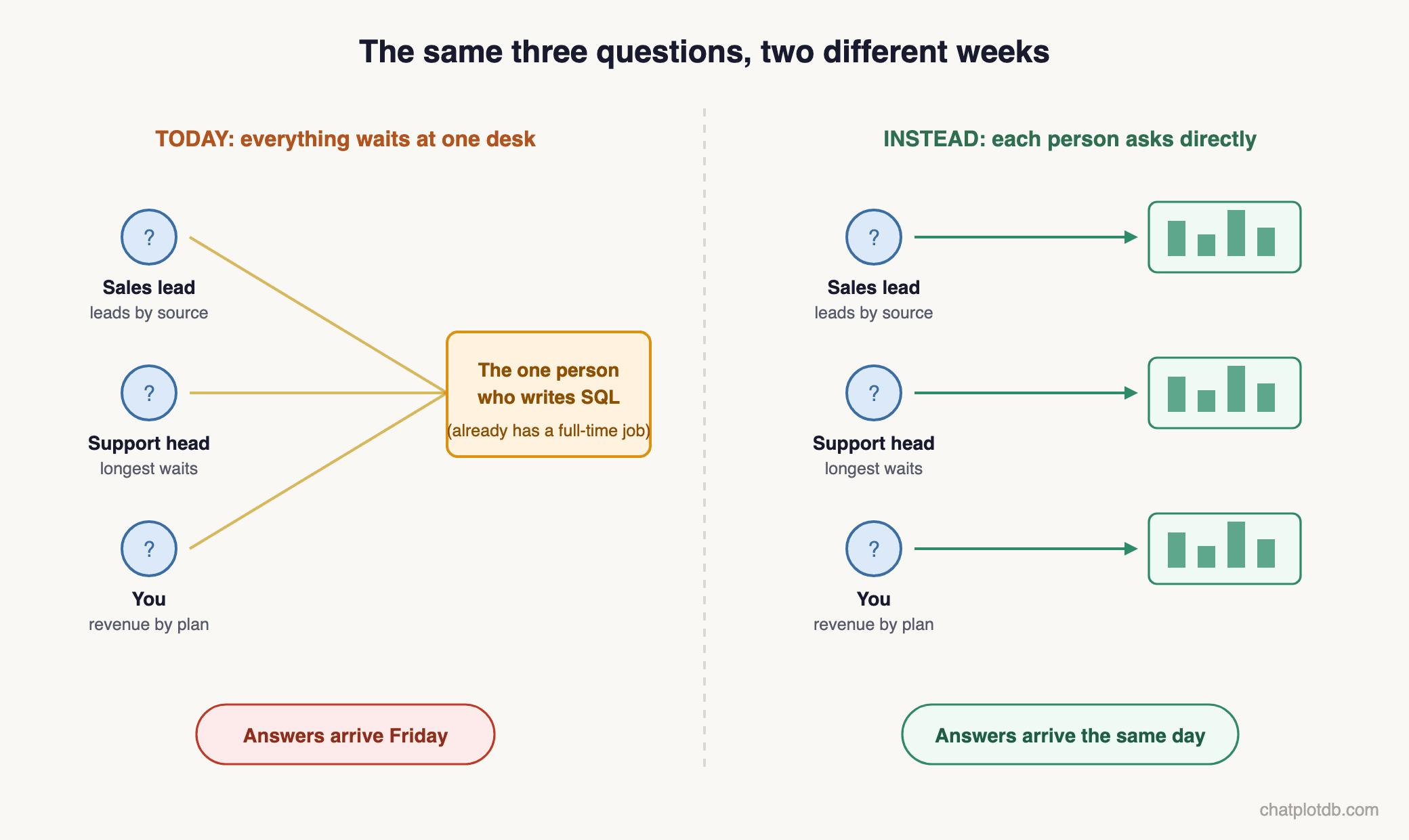
Every data question in your company ends at the same desk. The sales lead wants last month's leads by source. The support head wants to know which customers have waited longest for a reply. You want revenue by plan — how much money each pricing plan brings in — before tomorrow's meeting about prices. All of it lands on the one person who can write SQL — the language most databases understand — and that person also has a full-time job. The answers arrive on Friday. The decisions were needed on Tuesday.
And people learn how long it takes. So many stop asking, and decide on gut feeling instead. The real cost of that queue is not the questions waiting in it. It is the questions that were never asked.
If that queue exists in your company, this post is for you. It explains why the queue exists and the honest ways teams try to end it — two of the three answers below are not our product — including the one question most articles skip: when the answer comes from software instead of a person, how does anyone know it is right?
The short answer: yes, a non-technical team can query the company database in plain English using today's AI tools and get charts back. The deciding factor is not the asking — it is trust. Pick a tool that shows its query, asks when your question is unclear, checks its own results, and can only read your data, never change it.
Why you cannot simply give everyone the database
The obvious fix is to hand everyone access and let each person ask directly. It fails for two reasons, and only the first one is SQL.
- SQL is a language. It has its own grammar, and learning it takes real time.
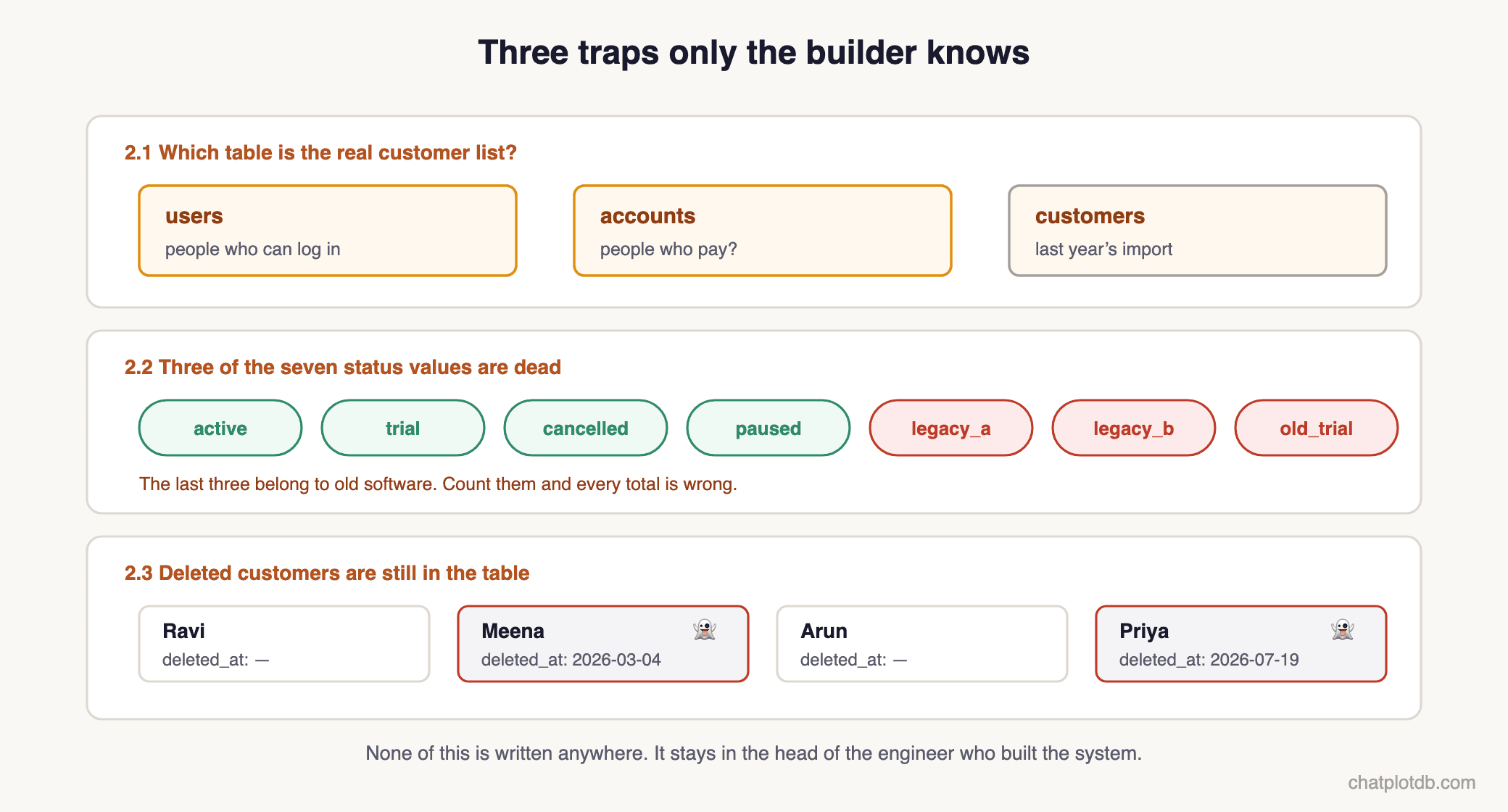
- Your database's layout. Even a person who knows SQL meets this second problem: the database is full of traps only its builder knows. Three examples:
- 2.1 — One table is called
users, anotheraccounts— neither name says which one is the real customer list. And even a promising name can mislead: a table calledcustomerssometimes turns out to be last year's import from an old billing tool. - 2.2 — A status column offers seven values — active, trial, cancelled and four more — but three belong to old software and must be ignored, or every total is wrong.
- 2.3 — A customer who deleted their account is often only marked deleted, in a column like
deleted_at— an honest count must leave those ghosts out, and nothing reminds you to.
None of this is written anywhere; it stays in the head of the engineer who built the system.
So access was never the barrier. Knowledge is, and it sits in one person's head.
Way one: teach the team SQL
When it fits: if the people asking are analysts who work with data all day, they already write SQL and can fetch what they want themselves. And for a team that works with data daily but has not learnt SQL yet, training is worth it — they will use it every single day, so the weeks spent learning are soon recovered.
Where it falls short:
- Training helps only the people who get it. Train two analysts and the sales lead and the support head now wait at those two desks instead of one. Asking still means waiting for somebody else.
- For people who ask only occasionally, weeks of learning buy very little. The sales lead needs a number twice a month. A skill used twice a month fades, and within a few months they are back to asking someone anyway.
- Knowing SQL is not the same as knowing your database. The new learner still cannot know which of the seven status values are dead — that knowledge is still in the head of the engineer who built the system.
- Trained people leave. And the training leaves with them.
So most companies stop trying to teach the questions and buy the answers instead.
Way two: buy a dashboard tool
A dashboard shows charts that somebody prepared earlier: revenue this month, leads this week. Someone builds the charts once, and the numbers inside them refresh themselves — so the questions stay fixed while the answers stay current.
When it fits: if your team checks the same few numbers every morning — yesterday's sales, this week's new signups, open support tickets — a dashboard is honestly the right tool.
Where it falls short: the cost appears the moment your question changes.
- A dashboard only shows the charts someone chose to build. Every dashboard is made by a person deciding, in advance, which questions it will answer. Your next question is rarely one of them. Remember the revenue-by-plan question from the opening? The night before the meeting it needs one extra condition: "revenue by plan, but only for customers who joined this year." Nobody built a chart for that version, so you are back in the queue.
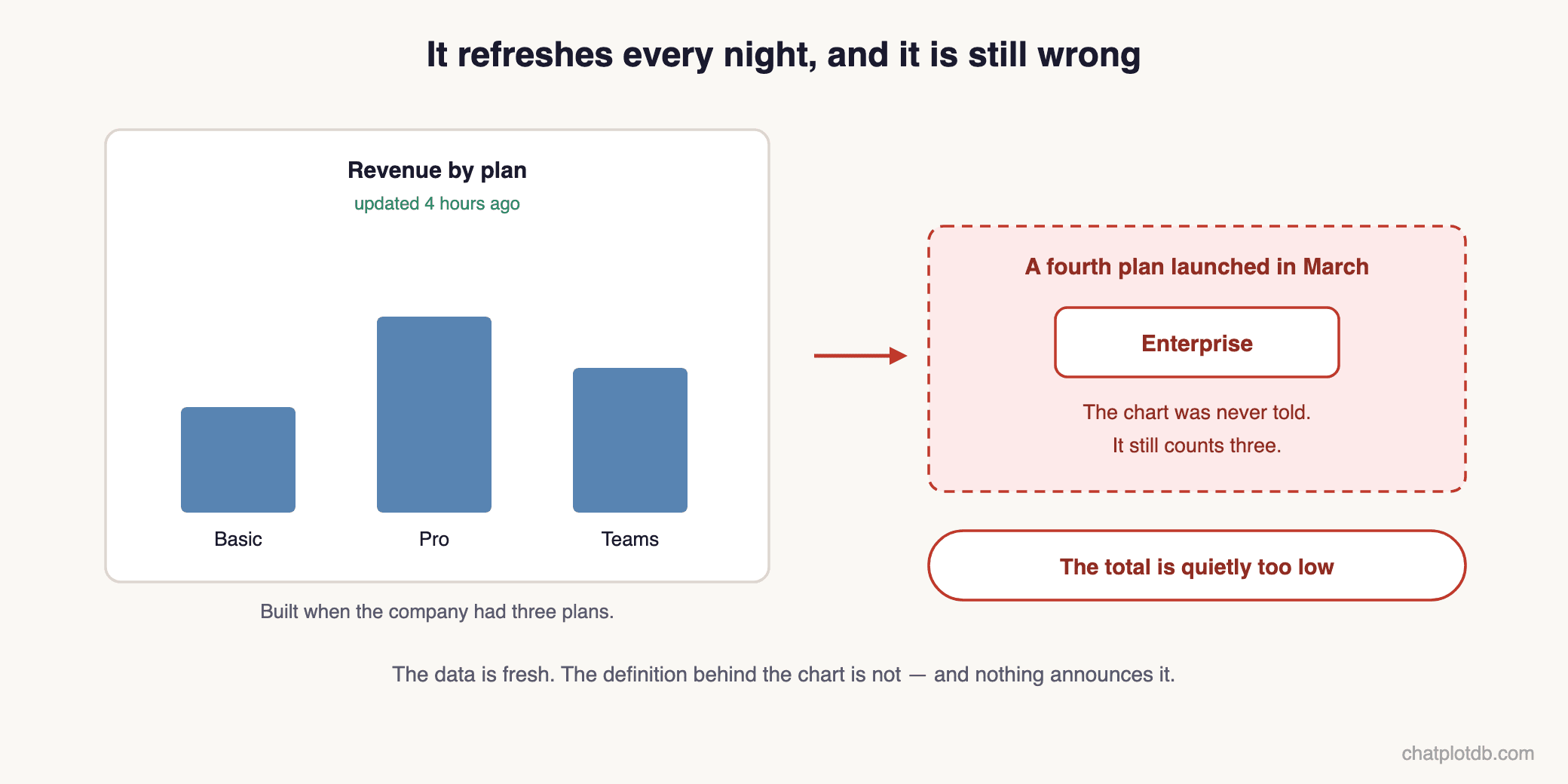
- A chart can go wrong while its numbers still look fresh. The dashboard pulls new data every night, so it always looks up to date. But when that chart was built, someone decided exactly what it should count — say, revenue from your three pricing plans. Months later the company launches a fourth plan. The chart keeps refreshing every night and keeps looking perfectly healthy, but it is still counting only three plans, so the total is quietly too low. Nobody is told.
Way three: paste the question into a general AI chat
The newest attempt skips both training and dashboards: paste your table layout into a general AI chat and ask it to write the SQL for you.
When it fits: if you can read SQL, this is a real time-saver. The chat drafts the query in seconds, and you can catch a wrong one before it runs.
Where it falls short: the promise is that nobody needs SQL any more. And it is half true — you no longer need SQL to get a query. You still need it to trust one, and that is where three problems come together:
- The chat does not know your company's meanings. Whether "revenue" includes tax, which customers count as "active" — it guesses, and it can guess differently tomorrow.
- Someone still has to run it. The chat only writes the instruction; a person must then paste that instruction into a database program and run it. So the queue returns, just one step shorter.
- The answer sounds equally confident when it is wrong. A person who cannot read SQL has no way to tell which one they got.
And one quieter cost, whoever you are: your database's structure is being pasted into an outside chat window.
The real problem is not asking — it is trusting the answer
Notice what all three ways share. The expensive part was never typing the question. It is knowing whether the answer can be trusted.
And trust breaks only once. Imagine the revenue-by-plan number arriving in time for the pricing meeting — wrong, because it counted those deleted ghosts, and nobody could tell. Prices get set on it. After a mistake like that surfaces, the team stops believing every number that comes after it, and everyone quietly returns to the queue.
“Trust breaks only once.”
So the real requirement is stricter than "lets my team ask questions". It is: lets my team ask, and gives them reasons to believe the answer.
A newer way: AI that shows its work
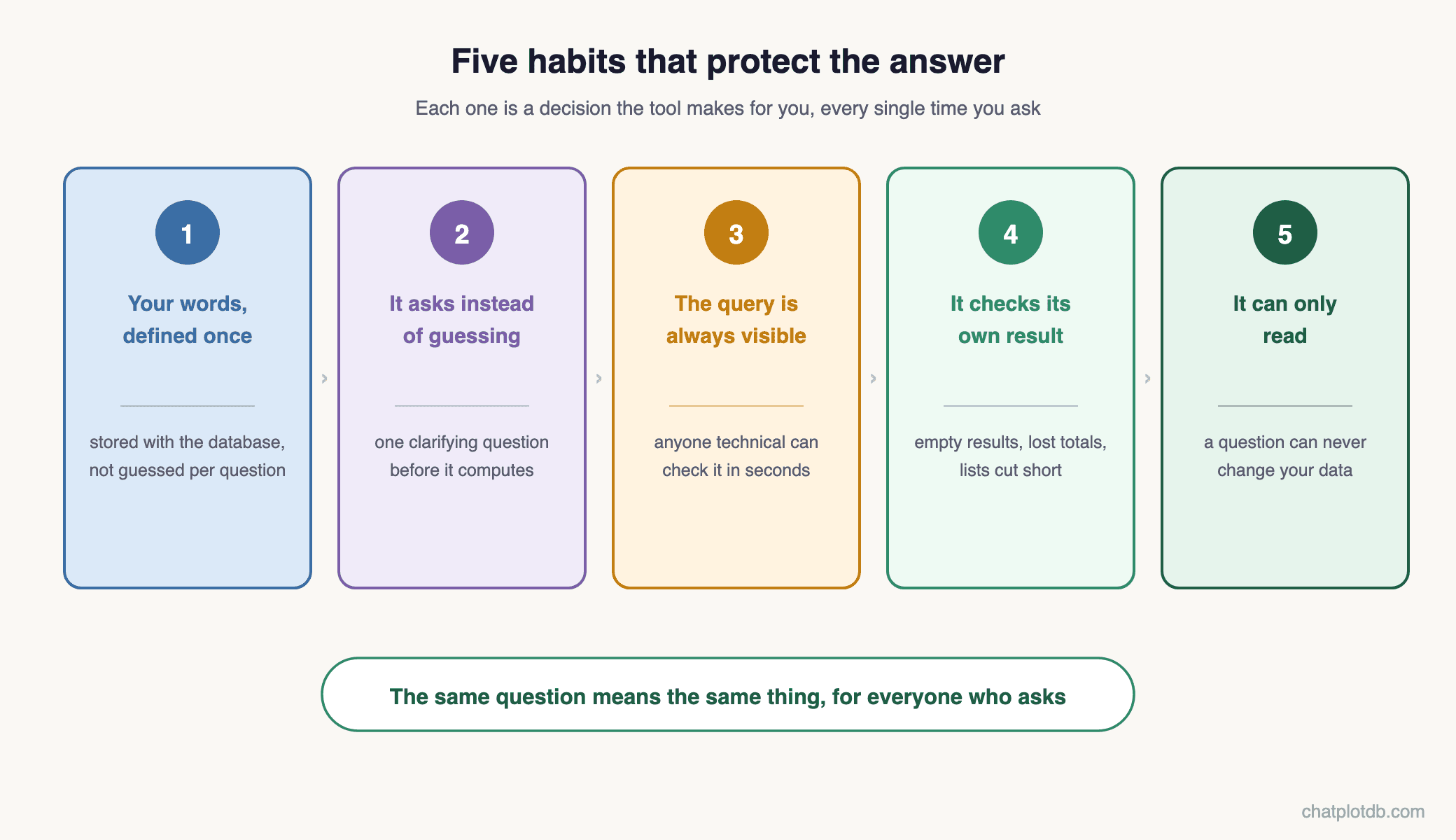
This trust problem is exactly what we built ChatPlotDB around. Anyone on the team types a question in plain English — a natural language query, in industry words — and gets back a chart or a table. Underneath, five habits protect the answer.
1. Your company's words are defined once. What counts as revenue, which customers are active, what a "big customer" means — these definitions are stored with the database connection, not guessed per question. The same question means the same thing every time, for every person who asks.
2. It asks instead of guessing. When a question honestly has two readings — "average monthly growth" can mean the change from one month to the next, or the average within each month — it stops and asks you one clarifying question first, instead of silently picking one.
3. The query is always there to read. Every answer carries the exact query that produced it, so anyone technical can confirm in seconds what was actually asked of the database.
4. It checks its own result. After a query runs, the result is examined for the errors that raise no error: an empty result; a question that asked for totals per city but got back thousands of separate rows instead of one total per city; a list quietly cut short at a round number. What the check finds is said next to the answer, not hidden.
5. It can only read. Every query runs in read-only mode, so nobody can change or delete anything by asking a question. Asking becomes safe by design, not by trust in people.
Two more things grow with use. When someone on the team marks an answer as good — a simple thumbs-up — that approved answer becomes an example the system follows for similar questions later — your team's confirmations make it better every week. And when your data is spread across more than one database — customers in one, payments in another — the same plain-English question can cover both. We wrote about joining two databases separately.
In the spirit of this post: every product claim above was checked against ChatPlotDB's source code before publishing — the same standard we are asking you to hold any tool to.
Which way should you choose?
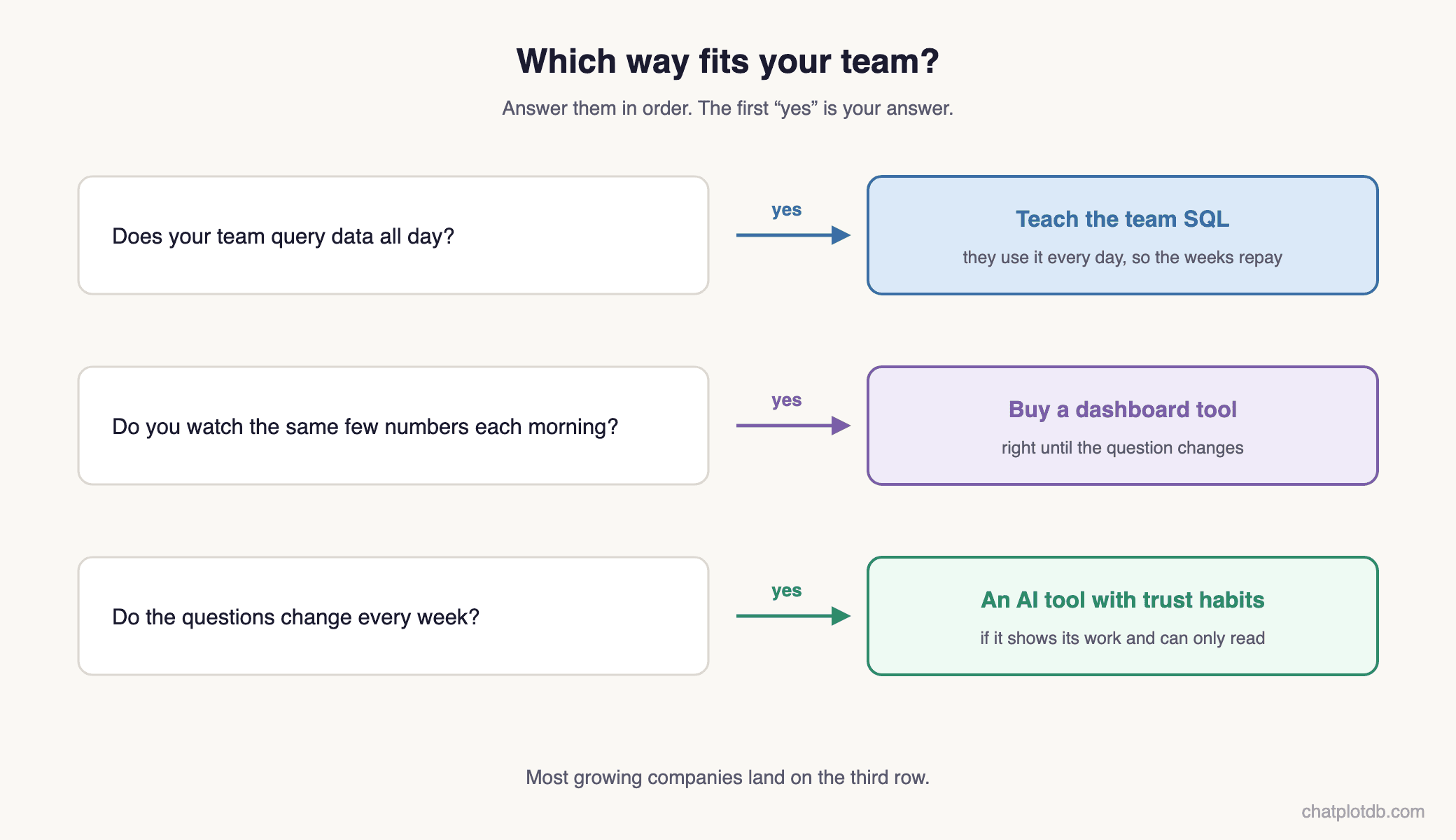
| The way | Its real cost | Choose it when… |
|---|---|---|
| Teach the team SQL | Weeks of learning, and the database's traps stay in one person's head | …your team queries data all day |
| Buy a dashboard tool | Shows only the charts someone built in advance; they quietly miss whatever changed later | …your team checks the same few numbers every morning |
| An AI tool with trust habits | Choosing the tool carefully | …questions change every week and no engineer is free |
If the last row is your situation — and it is the situation most growing companies are in — then a tool like ChatPlotDB was built for you.
Judge any tool by the trust question first
Does it show its query? Does it ask when unsure? Does it check its own results? Does it stay read-only? If yes, your team can finally ask their own questions — and believe the answers they get.
And the three questions this post opened with — leads by source, the longest-waiting customers, revenue by plan — stop waiting for Friday. Each one gets its answer on the Tuesday it was asked, while the decision still needs it.
Quick answers
Can a non-technical team really query a database without knowing SQL?
Yes. The person types the question in plain English, and the AI writes and runs the database query behind it — the industry calls this self-service analytics. The part to judge carefully is not the asking — it is whether the tool gives you reasons to trust the answer.
Is it safe to let AI query our company database?
It is safe when the tool can only read. ChatPlotDB runs every query in read-only mode, so asking can never change or delete data. The safety comes from how queries run, not from trusting people to be careful.
Why not just use ChatGPT or Claude?
You can — once someone technical connects them, which is itself a setup job rather than a switch. After that they will query a live database and answer well.
On your own, two chores never go away: teaching it your database in every new conversation — which tables matter, how they join, what your own words mean — and checking each answer yourself.
Across a team, three more problems appear:
- The password spreads. Each person's computer needs its own connection, with the database password stored on it.
- The meanings drift. The chat decides afresh in every conversation what your words mean, so two people can get two different numbers for "revenue".
- The answer is frozen and private. It stays as an old message in one person's chat history. It never updates itself, and nobody else can see it.
A tool built for this writes that knowledge about your database down once and checks it against your real data, so nobody teaches it again. It also keeps the password in one place, checks its own work, and turns the answer into a dashboard the whole team can watch stay current.
How do I know the AI understood my question correctly?
A trustworthy tool proves it: it asks a clarifying question when your question has two readings, shows the exact query beside the answer, and checks its own result for silent errors. If a tool hides all three, you are trusting a guess.